
October 15, 2025
Article
Best Home Office Upgrades Under $200 (2025)
Working from home has become permanent for millions of people, and the difference between a frustrating workspace and a genuinely productive one often comes down to a few smart upgrades. You don’t need a $1,500 desk or $800 chair to improve your comfort or efficiency. In fact, many of the most powerful quality-of-life improvements sit comfortably below the $200 mark.
This guide focuses on upgrades that actually matter: better posture, better light, reduced strain, cleaner cable flow, higher-quality meetings, and a more organised, more pleasant workspace. Everything here has been selected with long-term reliability and day-to-day practicality in mind.
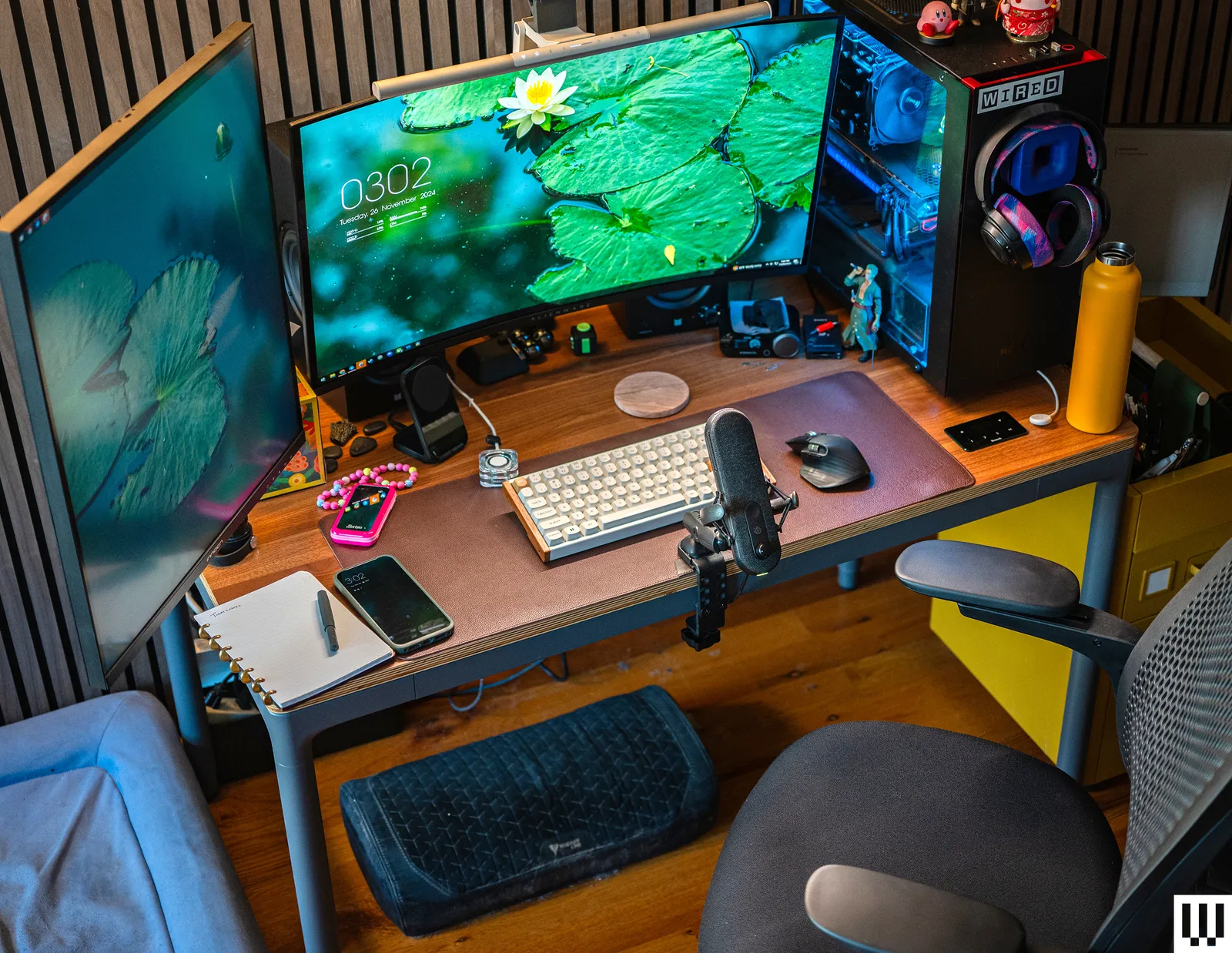
Why These Sub-$200 Upgrades Matter
High-end gear is great, but inexpensive changes often deliver the biggest returns. A $40 desk light improves your video calls more than many $600 cameras. A $39 laptop stand can eliminate neck pain. A $129 webcam produces more consistent results than most built-in laptop cameras. A $99 mic upgrade can instantly change how you sound on Zoom.
Small investments can transform your workflow more than big ones.
Your Question
What are the most impactful home office upgrades under $200 that actually improve comfort, productivity, and communication quality?
1. Laptop Stand (Ergonomic Lifts)
Raises your screen to eye level and eliminates neck strain.
The cheapest and most effective WFH upgrade is a laptop stand. Many workers spend hours hunched over a desk, and lifting the laptop by even 15–20 cm can dramatically reduce shoulder and neck tension.
What makes it valuable
Improves posture instantly
Reduces long-term strain
Frees desk space for keyboards and notebooks
Allows for better camera angles during calls
Works for dual-screen setups, too
Quality stands under $40–$60 have stable aluminium frames and adjustable height.
Buy the Soundance Laptop Stand on Amazon
Buy the Nulaxy Laptop Stand on Amazon
2. External Keyboard & Mouse Combo
More ergonomic, more accurate, and more comfortable than laptop inputs.
If you lift your laptop on a stand, an external keyboard and mouse become essential. But even without a stand, they offer better ergonomics and reduce wrist strain.
Benefits
Better typing posture
Less heat and strain on hands
Faster navigation
Cleaner workspace flow
Mechanical keyboards are growing in popularity, but even a simple low-profile wireless combo makes a noticeable difference.
Buy the Logitech MK850 Combo on Amazon
Buy the Logitech MK470 Slim Combo on Amazon
3. Desk Lamp or Ring Light
Better lighting dramatically improves video quality and reduces eye strain.
Lighting affects everything: your mood, your alertness, your video call appearance, and even your posture. Positioning a small desk light or soft ring light behind your monitor is one of the quickest ways to look professional on Zoom or Teams.
Why it matters
Eliminates harsh shadows
Brightens your face without washing it out
Reduces reliance on grainy webcam processing
Helps with evening work or low-light home setups
Buy the BenQ e-Reading Desk Lamp on Amazon
Buy the Neewer Ring Light on Amazon
4. USB-C Hub or Docking Station
A central hub that keeps your desk organised while expanding connectivity.
USB-C hubs solve a huge pain point: limited ports on ultrabooks and modern laptops. A good hub lets you connect monitors, keyboards, drives, SD cards, audio gear, and ethernet, all through a single cable to your laptop.
Why it’s essential
Clean desk setup
More ports for peripherals
Easy one-cable connection
Widely compatible with Windows, Mac, iPad
Buy the Anker 7-in-1 USB-C Hub on Amazon
Buy the Plugable USB-C Hub on Amazon
5. Wireless Headset or ANC Earbuds
Improved meeting clarity and background noise isolation.
You don’t need a $400 ANC headphone to sound good in meetings. Affordable ANC earbuds or compact headsets significantly upgrade call quality, especially in noisy homes or during multi-person meetings.
Why they make a difference
Clearer microphones
Better noise isolation
More comfortable than laptop speakers
Better for focus sessions
Buy the Sony WF-C700N on Amazon
Buy the Anker Soundcore Space A40 on Amazon
6. External Webcam
Sharper image, better low-light performance, and more consistent video quality.
Laptop webcams have improved, but most still fall short, especially in poor light. A dedicated webcam produces a clearer, more flattering image and offers controllable framing.
Benefits
Better clarity
Better color accuracy
Stable exposure
Useful field-of-view choices
Stronger low-light performance
Recommended Options
Buy the Logitech C920s on Amazon
Buy the Logitech Brio 300 on Amazon
7. Desk Mat and Wrist Support
Adds comfort and reduces friction during long work sessions.
A quality desk mat transforms the feel of your workspace — smoother mouse movement, better writing surface, and reduced noise from typing.
Benefits
Cleaner visual setup
Better wrist comfort
Protects desk surfaces
Improves mouse tracking
Buy the Gimars Keyboard Wrist Rest on Amazon
Buy the Aothia Desk Mat on Amazon
8. Cable Management Upgrades
Velcro straps, cable sleeves, under-desk trays.
A clean desk reduces stress and improves concentration. Cable management is inexpensive and surprisingly impactful.
Best simple upgrades
Velcro ties
Under-desk cable trays
Cable sleeves
Adhesive cable clips
Buy the Scandinavian Hub Cable Tray on Amazon
Buy the OHill Cable Clips on Amazon
Summary: Best Upgrades Based on Your Priority
For comfort:
Laptop stand, external keyboard/mouse, wrist rest.
For meetings:
Webcam, light, ANC earbuds/headset.
For organisation:
USB-C hub, desk mat, cable management.
For general productivity:
Monitor riser, lighting, clean desk layout.
FAQs – Real Questions from Remote Workers (answered by CreatorChat)
Q: What’s the best first upgrade if I only buy one item?
A laptop stand — it solves posture issues immediately.
Q: Is a webcam really worth it?
Yes. Good lighting + webcam is the biggest step up in call professionalism.
Q: Should I invest in an external mic or ANC earbuds first?
If meetings are frequent, ANC earbuds. If you present or teach, an external mic.
Q: Do I need a dock or just a USB-C hub?
Hubs are cheaper and fine for most people. Docks are for dual monitors or power users.
Q: What’s the cheapest upgrade with the biggest impact?
Desk lighting — it instantly improves video quality and reduces eye strain.